
Beginner's Guide | How to Create an On-chain Wallet, Withdraw Coins, and Buy Coins?

Original Title: "Beginner's Guide: Step-by-Step to Play with On-Chain Meme Transactions"
Original Author: Asher, Odaily Planet Daily
In today's cryptocurrency world, mastering the creation and use of Web3 on-chain wallets, understanding how to buy popular on-chain tokens, and having some on-chain data analysis capabilities have become key ways to seize money-making opportunities.
As Bybit Co-Founder and CEO Ben Zhou stated in a post on Platform X, "Last weekend, all CEXs saw a large amount of SOL and USDC flowing out to go on-chain to buy TRUMP. Moonshoot + Meteora/Jupiter created over 30 billion TRUMP meme coins in less than 10 hours and did not rely on any CEX. We are accelerating the development and promotion of on-chain wallets, monitoring tools, etc. If we do not join this revolution, we will be left behind."
Today, Blockworks' data analyst Dan Smith pointed out in a post on Platform X that Solana's decentralized exchange (DEX) trading volume hit a historic high, with a daily trading volume of 33.6 billion USD. Specifically, the trading volume of the Trump Family token was 9.6 billion USD, the SOL-USD trading pair volume was 10.4 billion USD, and the stablecoin exchange volume was 0.85 billion USD. This data fully reflects the vibrancy of the Solana ecosystem and the high level of user participation in decentralized platforms.
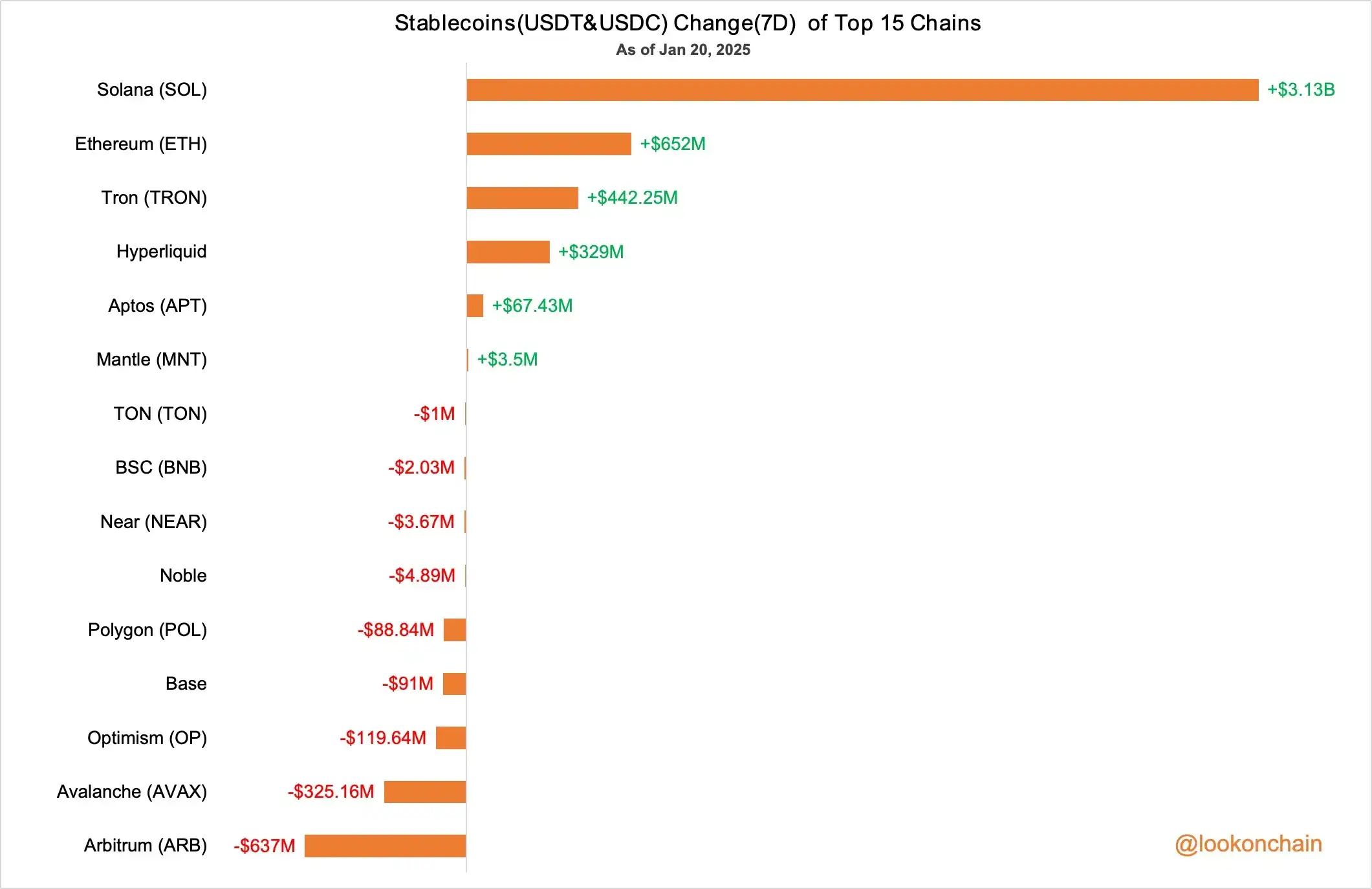
Meanwhile, according to Lookonchain monitoring, in the past 7 days, the total amount of stablecoins (USDT and USDC) on Solana has increased by 3.13 billion USD, showing the market's continued optimism towards the Solana ecosystem.
Given the high demand for tutorials from newcomers, Odaily Planet Daily will use SOL as an example (also where most wealth opportunities occur):
For "veterans" familiar with centralized exchanges—demonstrating how to withdraw funds on an exchange and explaining how to complete transfers through cross-chain methods when SOL withdrawals are suspended;
For pure newcomers outside the crypto circle—introducing the creation and use of Web3 wallets, how to buy on-chain projects, and recommended common on-chain tools.
Owning an On-Chain Wallet is a Prerequisite
Unlike centralized exchanges, users participating in on-chain cryptocurrency trading need to have a dedicated on-chain wallet. For "on-chain newbies," this is the first step to entering the crypto market. Currently, the Phantom Wallet and OKX Web3 Wallet are the two most common on-chain wallets, especially Phantom, whose ranking in the U.S. iOS App Store surpasses Coinbase, demonstrating its wide popularity. Since most newbie users primarily trade through mobile devices, the following will show detailed steps on how to create an on-chain wallet on a mobile device (similar steps can be followed on a computer).
Phantom Wallet Creation
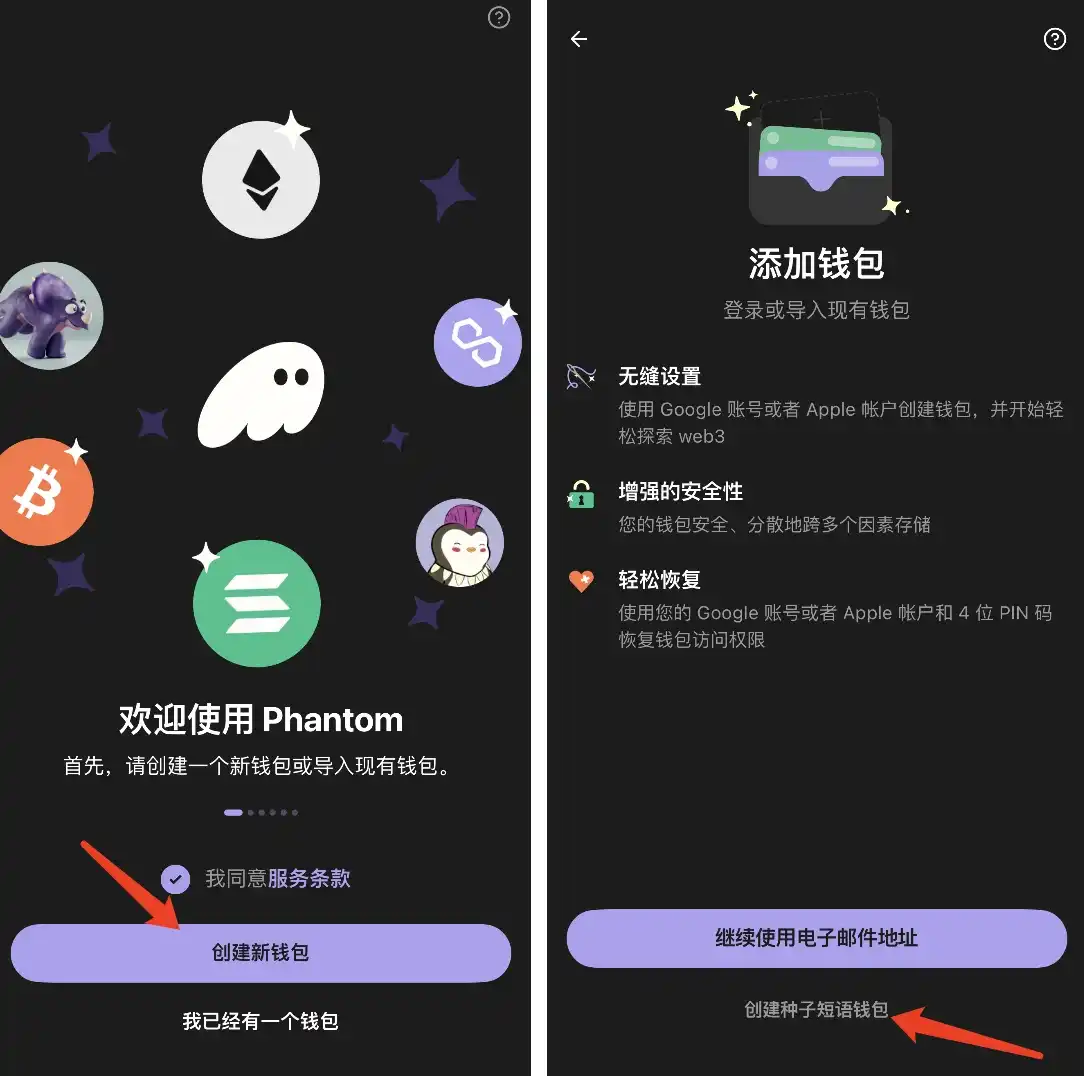
STEP 1. Download the Phantom App from the corresponding app store on your phone, then click the software, click "Create New Wallet," and select "Seed Phrase Wallet."
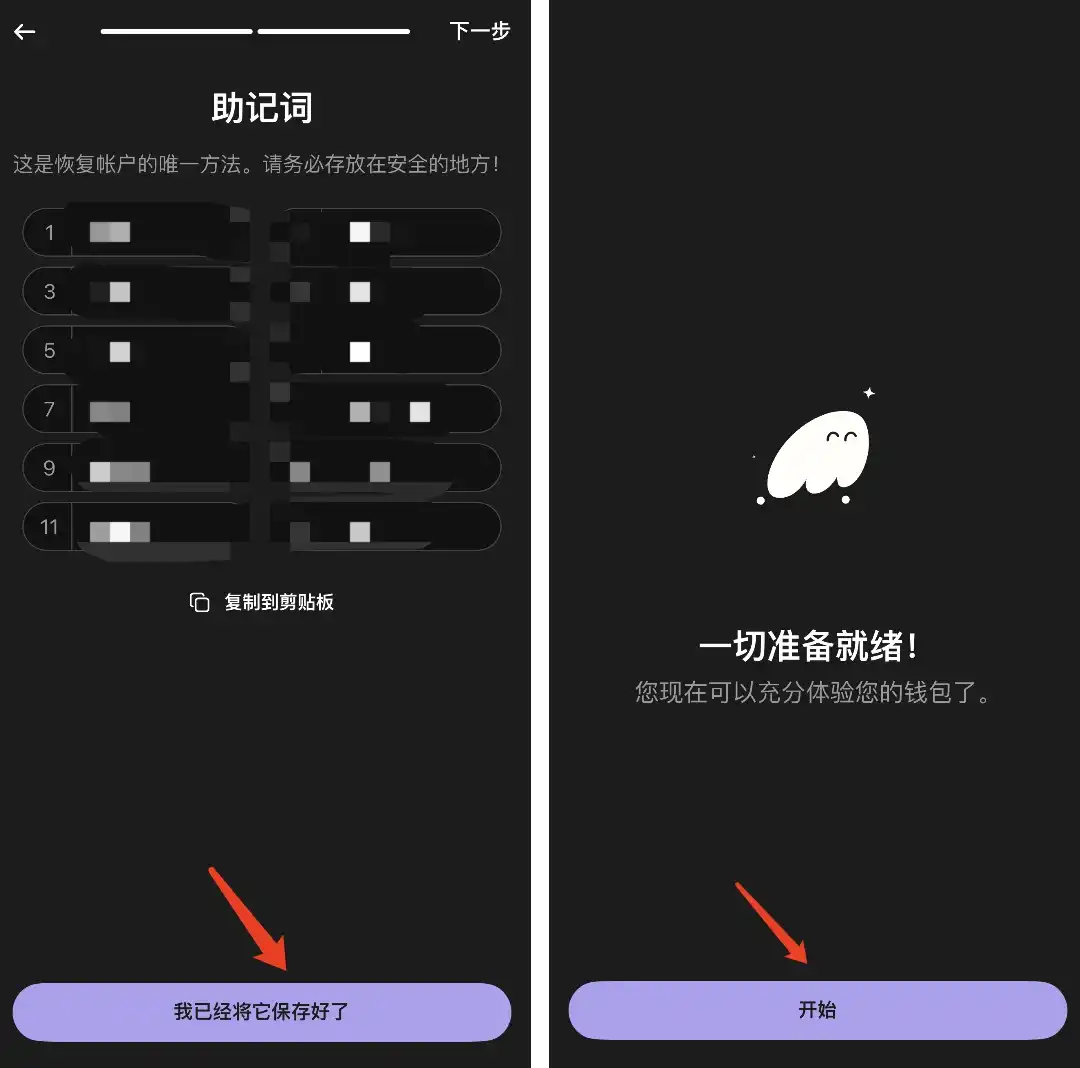
STEP 2. Save the seed phrase, preferably handwritten, as this is the only way to recover your wallet. Do not tell it to strangers.
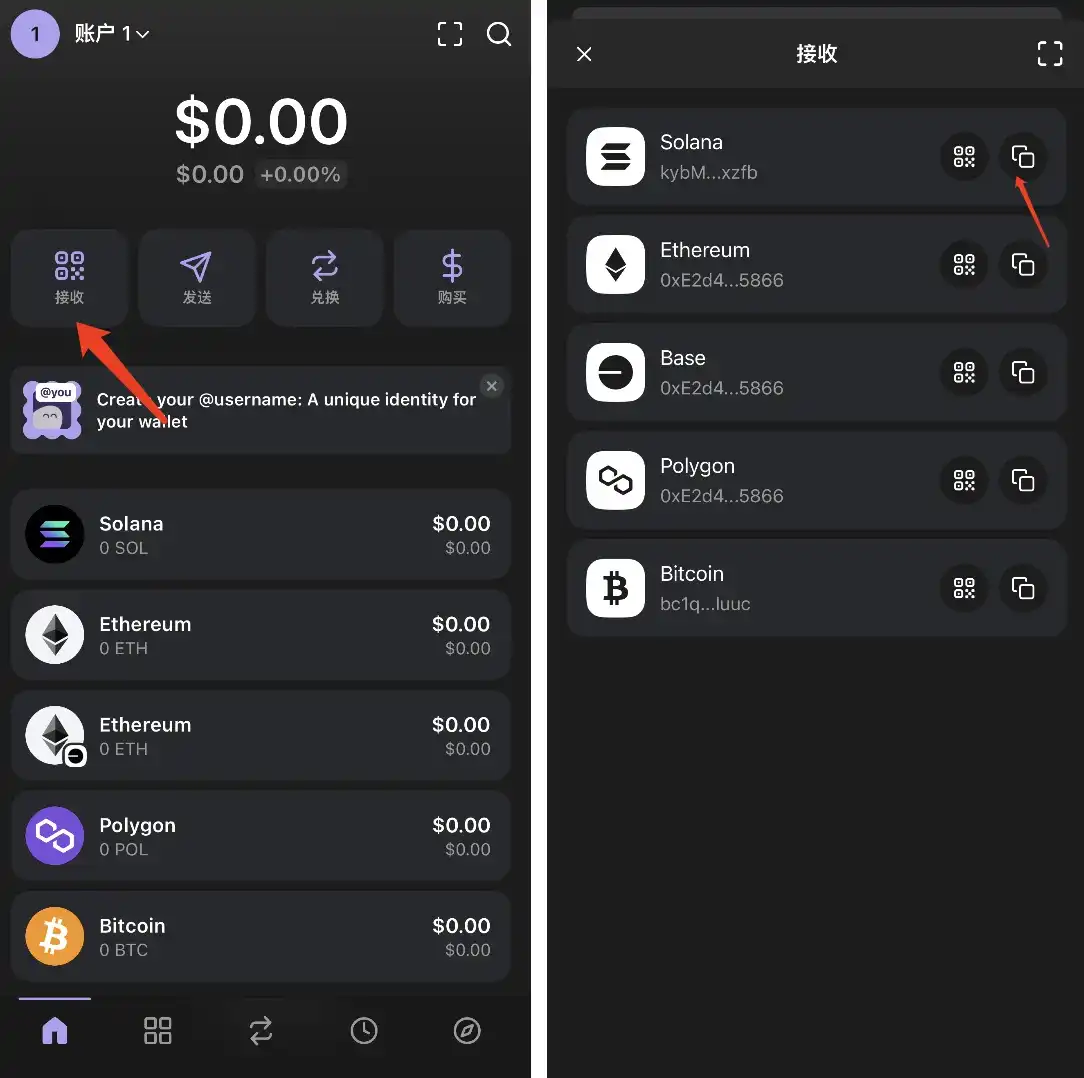
STEP 3. Obtain your wallet address.
OKX Web3 Wallet Creation
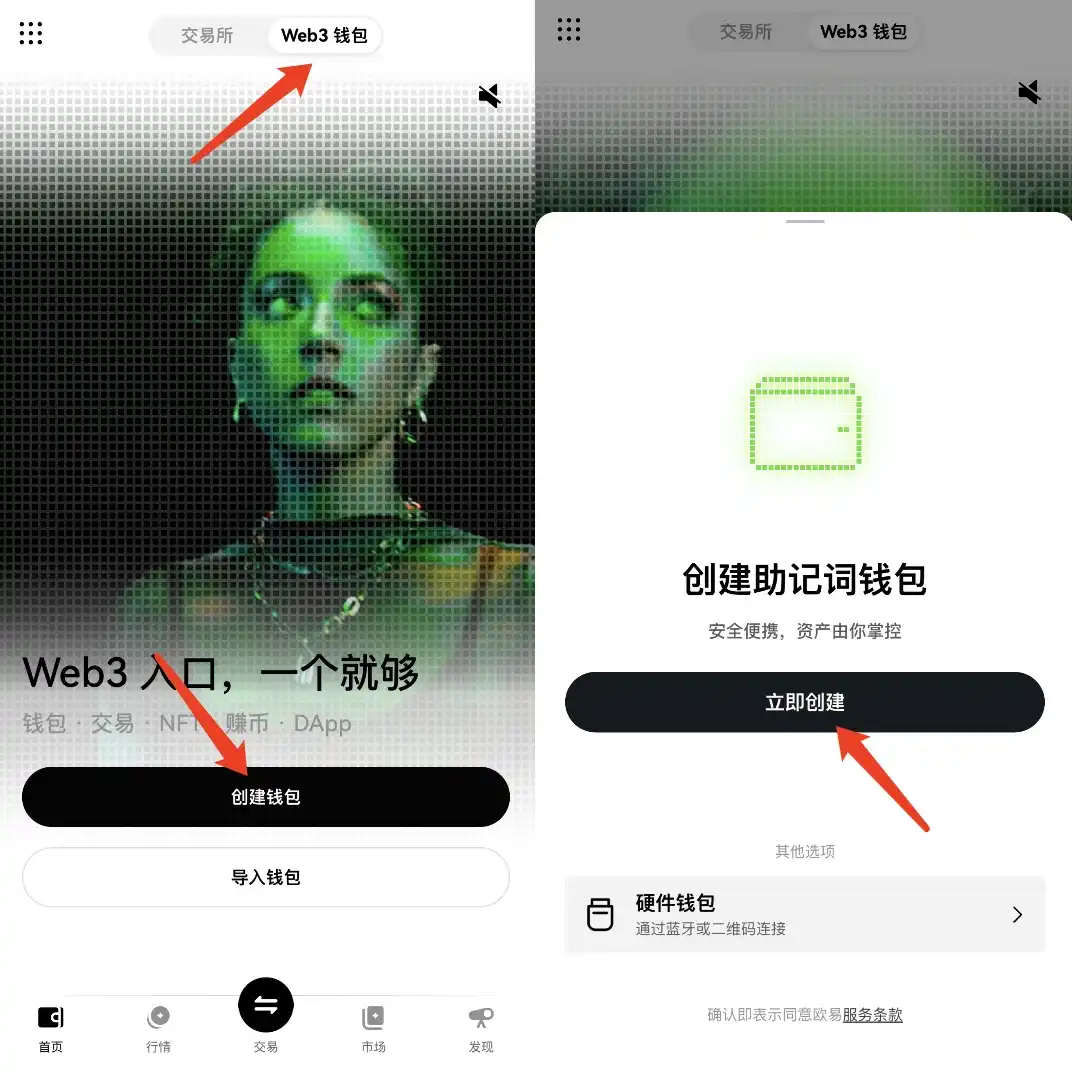
STEP 1. Enter the "OKEx" App, click at the top to switch to "Web3 Wallet," then click "Create Wallet."
STEP 2. Click "Manual Backup" to record the seed phrase.
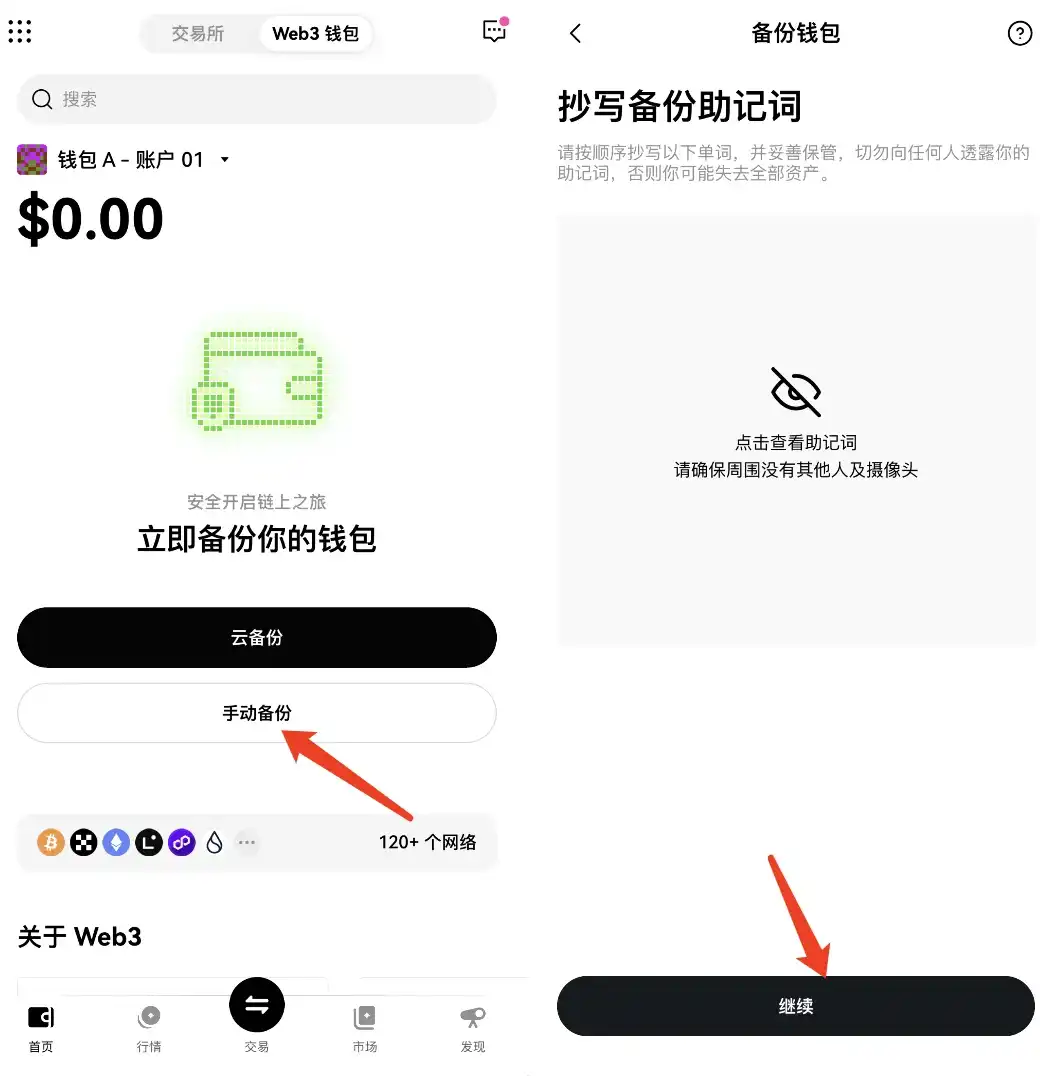
STEP 3. Obtain your wallet address.
(Odaily Planet Daily Reminder: The seed phrase is very important, so make sure to keep it safe.)
Exchange Withdrawal to On-Chain Wallet
Withdrawing SOL from Exchange to On-Chain Wallet
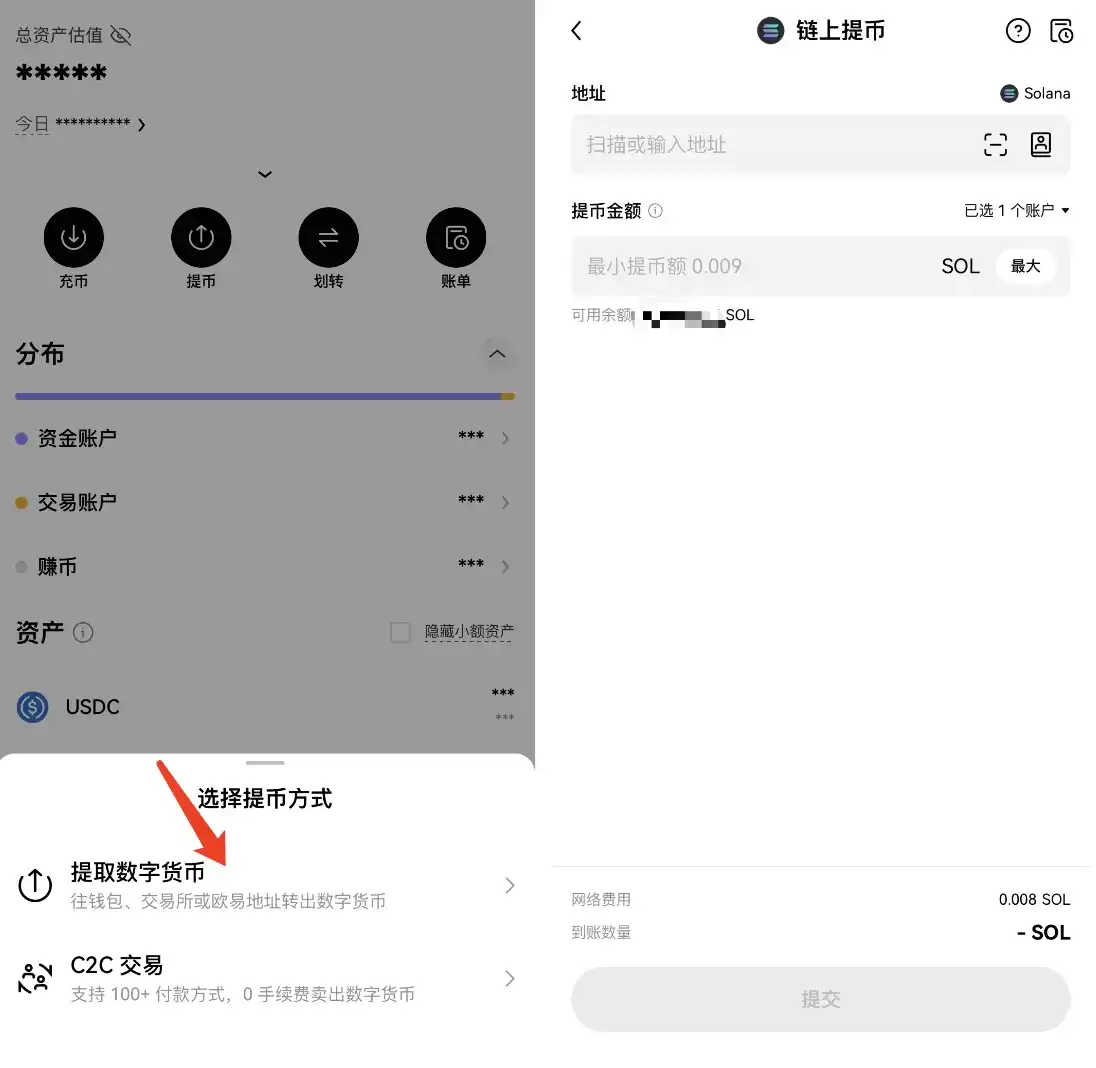
Go to a centralized exchange (using OKEx Exchange as an example), select "Withdraw," then choose "Withdrawal," select the SOL token, enter your wallet address (some currencies, like USDT, have multiple chain versions, so be sure to check the correct network when withdrawing).
How to Obtain SOL through Cross-chain Transfer when Withdrawals are Paused
For most users looking to purchase popular tokens in the Solana ecosystem, the typical process involves first buying SOL on a centralized exchange and then withdrawing it to their on-chain wallet. However, during events like the "Trump Couple Token Airdrop," a surge in users withdrawing SOL can lead to delays in withdrawals or even a pause in withdrawals. At this point, knowing how to perform cross-chain transfers becomes crucial to ensure timely purchase of high-demand tokens. The specific steps are as follows:
Cross-chain Website: https://portalbridge.com/usdc-bridge/
STEP 1. Withdraw USDC from a centralized exchange to the Avalanche, Arbitrum, or Optimism chain.
STEP 2. Using the aforementioned cross-chain website, transfer USDC from the Avalanche chain to the Solana chain (Avalanche chain is recommended due to general transaction confirmation times on Ethereum layer 2 solutions, which can take significant time during congestion, sometimes over half an hour).
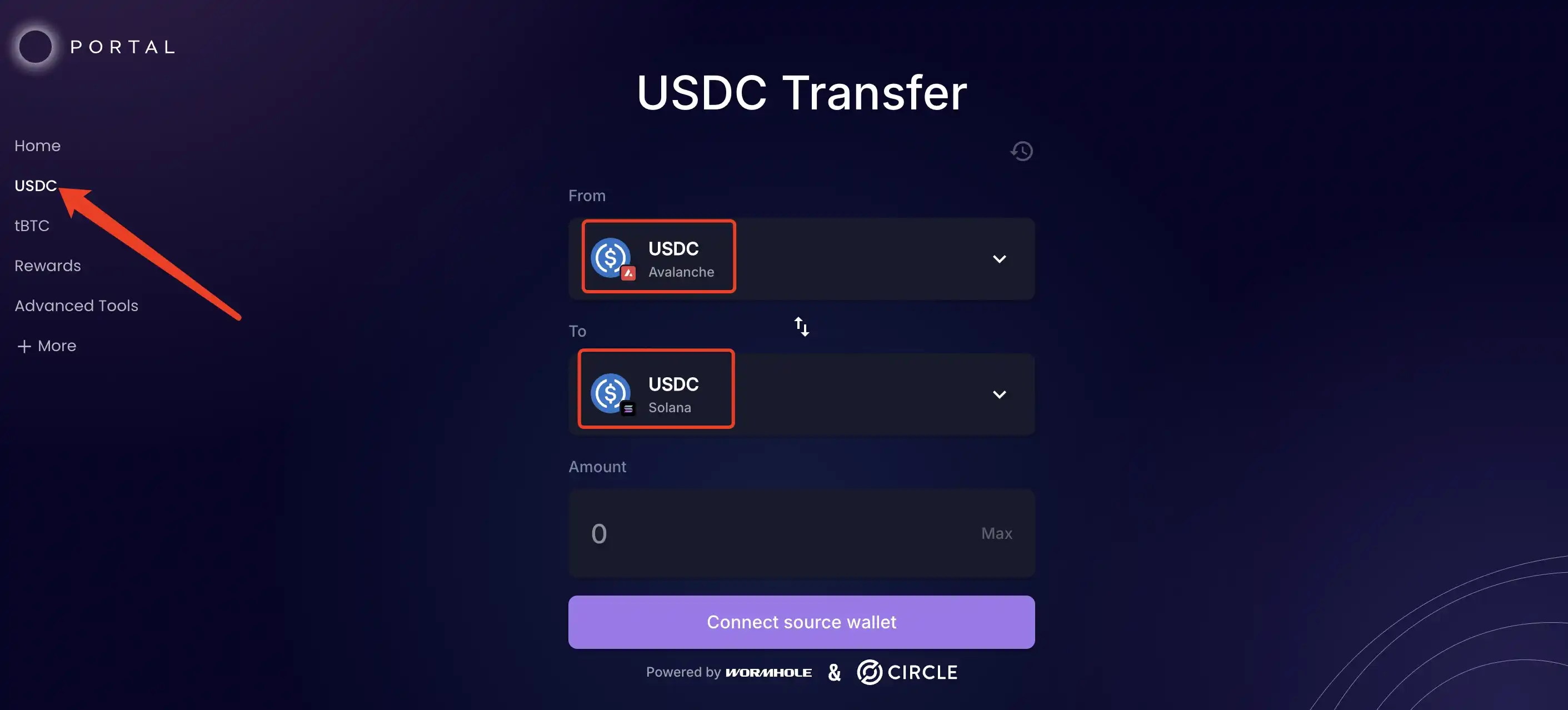
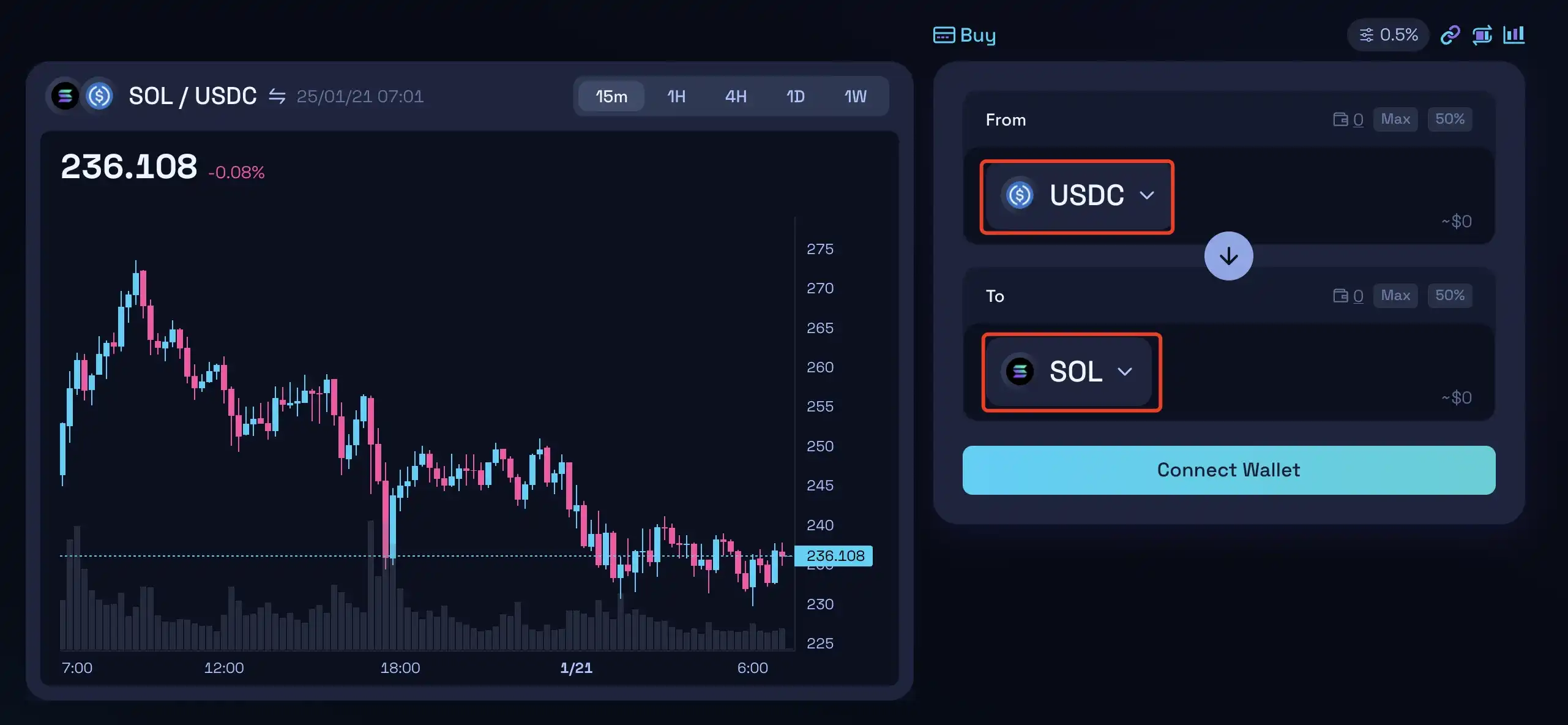
STEP 3. Once you have successfully transferred USDC to the Solana chain, you can swap it for SOL (Demo: https://raydium.io/swap/).
How to Purchase Popular On-chain Tokens
Direct Purchase on a DEX
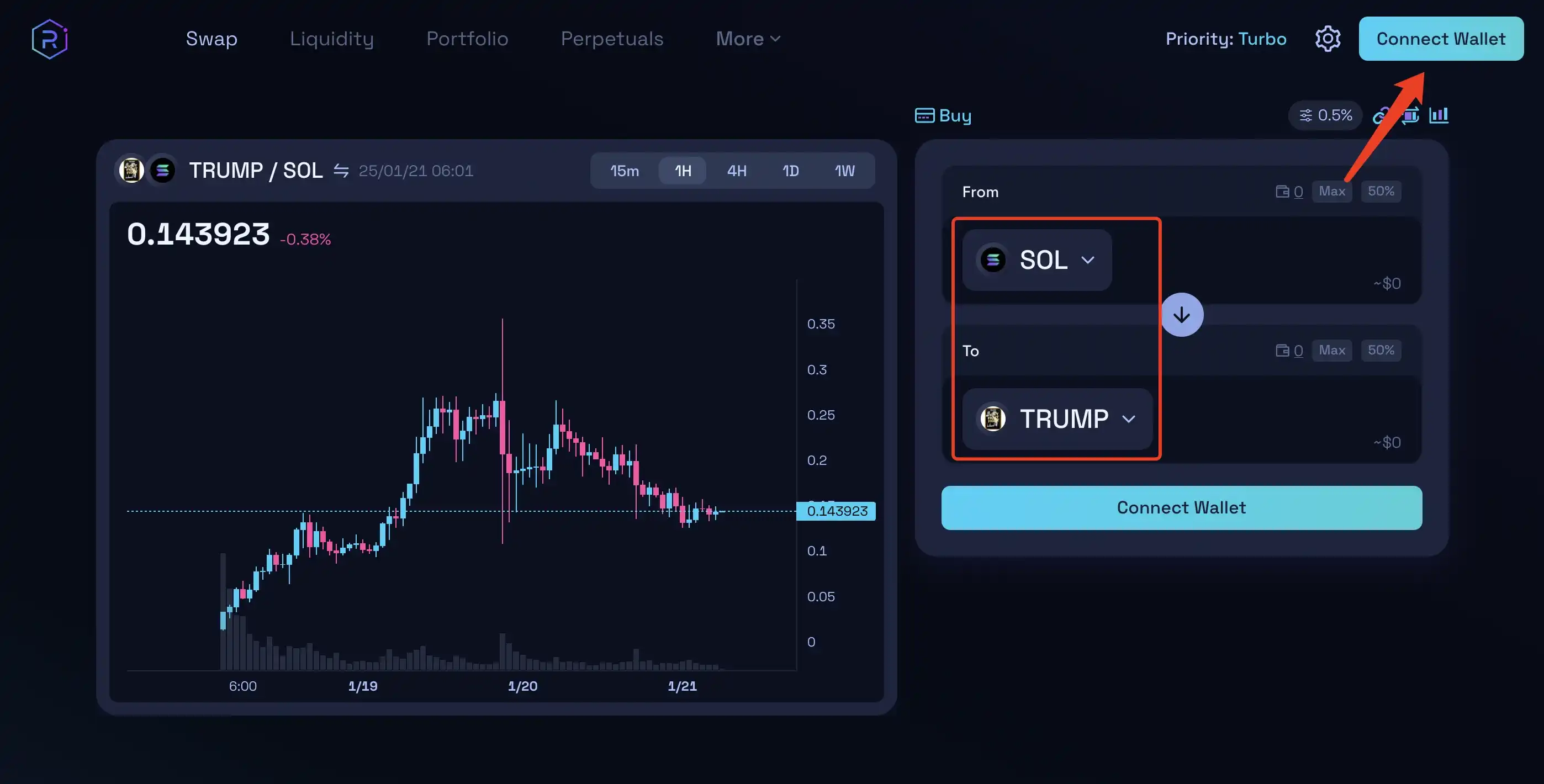
As of January 19th, according to DeFiLlama data, Raydium's 24-hour trading volume has surpassed that of Tether, ranking first. Raydium's 24-hour trading volume is $25.24 million, while Tether's is $17.65 million. It is evident that most purchases of tokens on the Solana ecosystem occur on the Raydium platform, with its official link being: https://raydium.io/swap/. Connect your wallet and select the desired token to proceed with the transaction.
On one hand, when a project's trading activity is high, relying solely on Raydium may not always result in smooth and timely buy/sell operations. On the other hand, since newly launched on-chain projects lack fundamental analysis basis due to their recent listing, investors can only assess their trends by observing factors such as token distribution, smart money inflow, and potential project manipulation. Investing blindly in meme coins carries high risks, but by mastering basic on-chain analysis techniques, one can significantly increase their success rate. Therefore, to better engage in on-chain trading and profit from it, it is recommended to use GMGN for transactions.
Using On-Chain Tool GMGN
GMGN is a website that combines a Meme Coin data dashboard with a trading tool. To use GMGN, visit the official GMGN site, connect your wallet, enter the token contract address you want to buy in the search bar, and input the amount of the token you wish to purchase (or sell) on the right side of the interface.
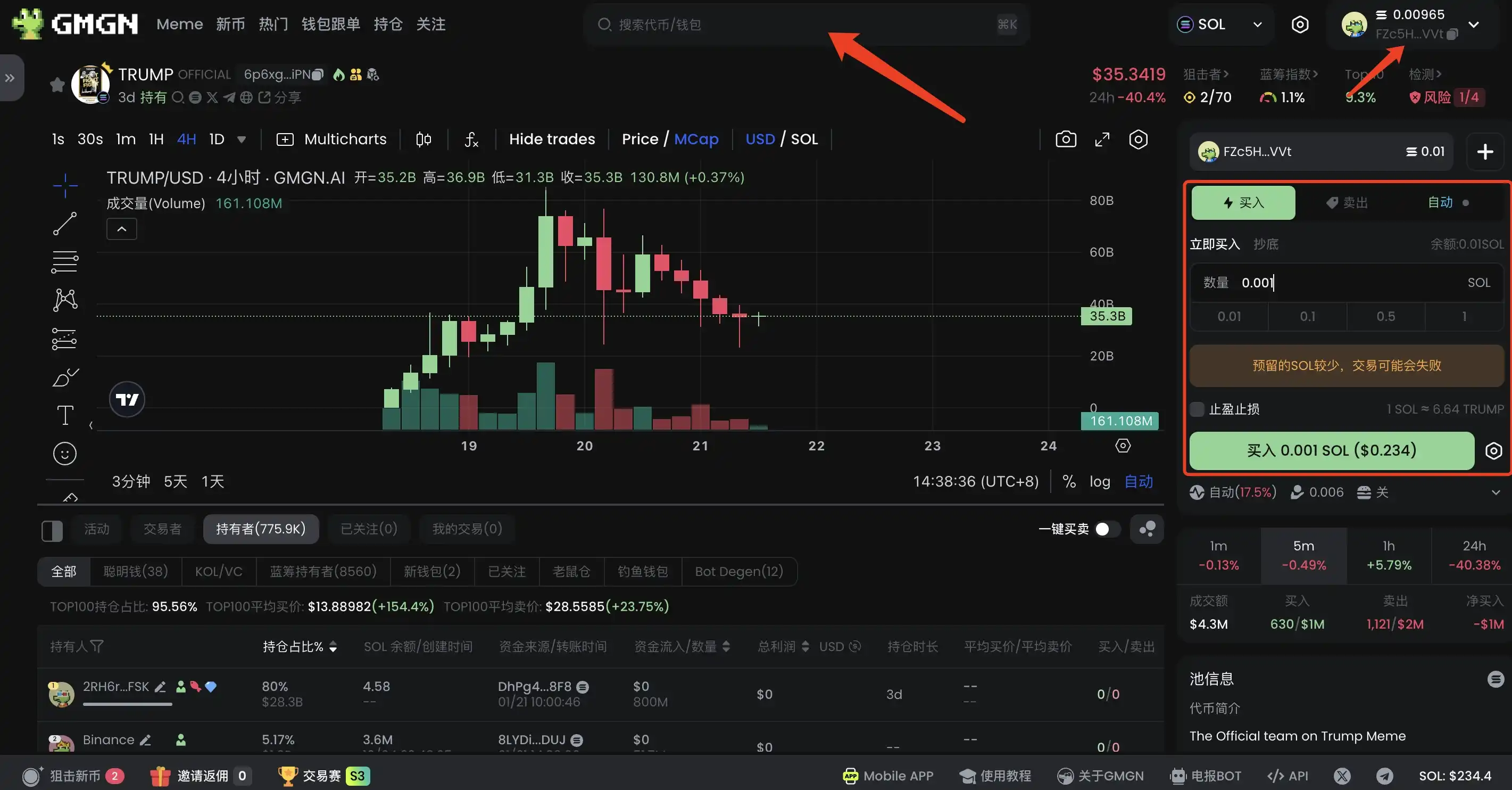
The above is just a simple introduction to the GMGN operating interface. For more GMGN operating tutorials, please refer to the following two articles:
100x Overnight? How to Use GMGN to Play with Meme Coins (Beginner's Guide)
How to Become a Meme Coin Trading Expert? (GMGN Advanced Guide)
You may also like

Morning Report | BitMine increased its holdings by 126,971 ETH last week; trader Eugene announced his exit from the crypto market

Wang Chuan: How can one not feel anxious after the neighbor Old Wang made thirty times profit by investing in storage stocks? (Seven) - A quarter-century cycle

Get Paid to Onboard? Try WEEX’s New Homepage with Rewards for Registration, Deposit & Trade

WEEX Custom Layout: Build Your Perfect Trading Workspace in Seconds

See “Buy Walls” & “Sell Walls” Instantly: WEEX Launches the Depth Chart for Smarter Trades

What Is Quick Trade on WEEX? 2 Ways WEEX Ends Chart-Panel Jumping

Morning News | Five major virtual asset platforms in South Korea have experienced 57 incidents of hacking and system failures in six years; Grayscale submits registration application for Canton ETF

Should we escape the peak? The principle of the tail-end market in the stock market

RootData: May 2026 Cryptocurrency Exchange Transparency Research Report

Founder of Baixing.com: My Experience with Claude Code in Fourteen Points

Yang Ge Gary: Agent Economics and AI Microeconomics
When reasoning becomes a scarce resource, who captures its value?
Jensen Huang dramatically "rescues" the South Korean stock market

Stablecoins vs Deposit Tokens: On the surface, they seem like opposing sides, but in reality, they are interconnected

Bitcoin Crash to $50,000 or Bear Trap Before $100,000? Deep Dive for WEEX Traders
How Could the SpaceX IPO Affect Bitcoin, Altcoins season, and Crypto Liquidity?

The ambitions of Kalshi, MTS, and a16z
The AI bubble is bursting
Morning Report | BitMine increased its holdings by 126,971 ETH last week; trader Eugene announced his exit from the crypto market
Wang Chuan: How can one not feel anxious after the neighbor Old Wang made thirty times profit by investing in storage stocks? (Seven) - A quarter-century cycle
Get Paid to Onboard? Try WEEX’s New Homepage with Rewards for Registration, Deposit & Trade
WEEX Custom Layout: Build Your Perfect Trading Workspace in Seconds
See “Buy Walls” & “Sell Walls” Instantly: WEEX Launches the Depth Chart for Smarter Trades
What Is Quick Trade on WEEX? 2 Ways WEEX Ends Chart-Panel Jumping


